Employee Expense Management in Australia (2026 Guide)
Quick Answer
- Employee expense management is the process businesses use to track, approve, reimburse, and report employee expenses.
- Modern expense management software helps employees submit expenses faster while giving finance teams clearer visibility into company spending.
- Australian businesses use automated approval workflows, AI-powered receipt capture, GST tracking, and accounting integrations to reduce manual finance work.
Key Takeaways
- Employee expense management software reduces manual processing while improving reimbursement speed, spend visibility, and audit readiness.
- Modern spend management platforms help businesses manage travel expenses, remote work costs, corporate card transactions, and recurring subscriptions.
Employee expense management affects the employee experience before it affects the finance dashboard. Receipts disappear after flights from Sydney to Perth, employees pay out of pocket for client meals, and reimbursement can take weeks when approvals move through spreadsheets or email chains.
Those delays create frustration for employees and unnecessary follow-up work for finance teams. When an employee has to chase a manager for approval, the finance team cannot close the expense report, reconcile the transaction, or confirm whether the expense follows company policy.
Many Australian businesses still rely on spreadsheets, email approvals, shared folders, and disconnected reimbursement processes. As teams grow, that setup becomes harder to manage because finance teams must track expense data across travel bookings, software subscriptions, remote work equipment, and corporate card transactions.
Manual expense management also creates compliance pressure. Australian businesses need accurate GST records, clear approval histories, and searchable receipt archives for Australian Taxation Office (ATO) review. Missing receipts, delayed approvals, and inconsistent policy enforcement increase audit risk and slow the month-end close.
Expense management software helps solve those problems by giving employees an easier way to submit expenses and giving finance teams a clearer way to control spend. Spend management platforms can automate approval workflows, capture receipt data with machine learning, match card transactions, and sync expense data into accounting software like Xero Australia, MYOB, NetSuite, QuickBooks, Sage, and Microsoft Dynamics.
What Employee Expense Management Means
Employee expense management is the process businesses use to track, approve, reimburse, and report employee expenses.
A strong expense management process helps employees recover out-of-pocket costs quickly while helping finance teams maintain accurate records. The same process also supports GST tracking, company policy enforcement, approval governance, and reimbursement reporting.
Most employee expense management systems include:
- Expense submission: Employees submit expenses through a mobile app or desktop workflow instead of spreadsheets and email chains.
- Receipt capture: Employees photograph receipts or tax invoices so finance teams can maintain cleaner GST records.
- Expense tracking: Finance teams monitor employee spending across travel, subscriptions, reimbursement activity, and card transactions.
- Approval workflows: Automated routing sends expense claims to the right manager based on spend limits, departments, and project codes.
- Expense reporting: Dashboards help finance leaders review reimbursement trends, operating expenses, and policy exceptions.
- Expense reimbursement: Automated workflows help employees get repaid faster after submitting approved expenses.
- GST tracking: Expense systems capture GST amounts to improve Australian tax reporting accuracy.
- Accounting sync: Integrations with Xero, MYOB, NetSuite, QuickBooks, and other accounting systems reduce duplicate data entry.
- Policy enforcement: Spending limits and approval rules help reduce out-of-policy employee spending.
- Audit documentation: Searchable receipt archives improve ATO audit readiness and reimbursement traceability.
Employee expenses often include:
- Travel expense claims: Employees submit flights, accommodation, taxis, parking, and other business travel costs.
- Accommodation costs: Finance teams track hotel spending for interstate travel, client visits, and field work.
- Client meals: Managers review meal expenses against company policy and FBT considerations.
- Mileage reimbursement: Employees submit kilometre-based reimbursement claims for approved business travel.
- Remote work equipment: Hybrid teams request reimbursement for approved home office equipment.
- Software subscriptions: Finance teams track employee-purchased SaaS tools and recurring subscriptions.
- Employee spending: Staff may purchase approved goods or services on behalf of the business.
- Corporate card purchases: Card transactions are reconciled against receipts and policy rules.
- Virtual card transactions: Digital card spend is tracked across distributed teams and project budgets.
- Training expenses: Employees submit approved course, conference, or certification costs.
Employee expense management now extends beyond traditional travel and entertainment claims. Australian businesses increasingly manage remote work stipends, software subscription sprawl, hybrid workforce reimbursement, and distributed travel approvals across multiple locations.
Spreadsheet-based workflows were not built for that level of spending activity. Finance teams now process more digital transactions, more expense submissions, and more employee reimbursement requests across remote teams than older systems can handle effectively.
Without structured spend management workflows, businesses often face duplicate claims, delayed reimbursement, missing receipts, spreadsheet reconciliation, out-of-policy spending, poor audit visibility, inaccurate expense data, and a slow month-end close. Spend management platforms reduce those bottlenecks by automating repetitive finance workflows and centralising spend visibility.
Why Manual Processes Create Problems
Manual expense processes create problems because employees and finance teams work from different versions of the same information. Employees may submit receipts through email, managers may approve claims in spreadsheets, and finance teams may reconcile transactions inside accounting software days or weeks later.
The pressure becomes obvious during the month-end close. Employees forget to upload receipts, managers delay approvals while travelling, and finance teams chase missing documentation across Slack messages, inboxes, and shared drives. Reimbursement slows because accounting teams cannot reconcile incomplete expense reports.
Manual workflows also reduce visibility into company spending patterns. Finance teams may discover duplicate claims, policy breaches, or unusual spending only after transactions have already been reimbursed.
For finance leaders, delayed visibility affects cash flow planning and forecasting accuracy. Teams cannot optimise spending effectively when expense data sits across spreadsheets, travel tools, reimbursement workflows, and accounting systems.
Businesses with multiple entities, interstate teams, or project-based billing face even more complexity. Travel costs, client reimbursement, software subscriptions, and corporate card transactions become difficult to track when every team follows a slightly different process.
Risks From Manual Workflows
Manual expense management creates several recurring risks:
- Delayed reimbursement: Employees wait longer for repayment and finance teams handle more follow-up.
- Missing receipts: Lost invoices reduce GST recovery visibility and create audit gaps.
- Spreadsheet reconciliation: Month-end close slows when finance teams match expenses manually.
- Inconsistent approvals: Managers may approve out-of-policy spending without full context.
- Poor spend visibility: Finance leaders cannot see employee spending patterns in real time.
- Duplicate submissions: Disconnected systems make repeated claims harder to detect.
Finance teams lose strategic capacity when administrative work consumes too much time. Instead of analysing spending patterns or improving policy controls, teams spend hours correcting reimbursement errors and chasing approvals.
How Modern Spend Platforms Help
Spend management platforms automate the expense workflow from receipt capture through reimbursement and reporting.
Instead of reviewing every expense report line by line, finance teams can configure approval workflows, spending thresholds, GST requirements, and reimbursement rules inside one finance automation platform. Employees submit expenses through mobile apps or desktop workflows, while AI-powered receipt capture extracts merchant names, GST amounts, categories, dates, and transaction details.
Automation removes manual data entry from the employee experience and gives finance teams cleaner expense data from the start. Employees no longer need to rebuild a trip from memory weeks later, and finance teams no longer need to correct every missing field manually.
Expense management tools can:
- Categorise expenses automatically: Machine learning assigns spend categories based on merchant and transaction data.
- Flag duplicate expense claims: AI reviews receipt metadata, timestamps, and merchant details for repeat submissions.
- Detect policy breaches: Approval rules identify claims that exceed spend limits or company policy.
- Route approvals instantly: Claims move to the correct approver based on role, department, or project code.
- Sync expense data: Approved expenses flow into accounting systems to reduce manual reconciliation.
- Accelerate reimbursement: Employees receive repayment faster once approvals and finance checks are complete.
- Centralise reporting: Finance teams review expense reports, receipts, and approval history in one place.
- Improve audit visibility: Searchable records make GST and ATO documentation easier to retrieve.
When spend data updates in real time, finance leaders can manage budgets before costs escalate. Managers can identify unusual spending patterns earlier, while employees benefit from faster reimbursement and clearer claim status updates.
How Automation Changes Finance Workflows
Traditional expense reporting workflows depend on manual receipt uploads, spreadsheet tracking, delayed manager approvals, disconnected systems, and duplicate reconciliation. These steps create avoidable delays because each handoff depends on someone remembering to upload, review, approve, or re-enter information.
Finance automation replaces those bottlenecks with AI-powered receipt scanning, intelligent approval routing, real-time expense tracking, automated accounting sync, and faster reimbursement processing. Once repetitive reconciliation work decreases, finance teams can spend more time analysing spend patterns and improving policy controls.
What Features Do Finance Teams Need?
Australian finance teams need expense management software that improves the employee experience while strengthening GST tracking, approval governance, and accounting accuracy.
Basic reimbursement tools may suit small teams with simple workflows, while more advanced spend management platforms support multi-entity approvals, corporate card reconciliation, project accounting, and integrations with Australian accounting systems.
AI Receipt Capture
The latest spend management platforms use machine learning and Generative AI to capture receipt data automatically.
AI-powered receipt capture extracts:
- Merchant details: The platform identifies the supplier or merchant from the receipt.
- GST amounts: Tax data is captured to support Australian reporting requirements.
- Expense categories: Transactions are coded into the correct spend category.
- Transaction dates: Dates are extracted to support reporting and reimbursement timelines.
- Currency data: Multi-currency transactions can be recorded for international travel.
- Receipt metadata: The system stores supporting details for audit and review.
Employees no longer need to manually categorise expenses or complete repetitive data entry once receipt capture handles GST extraction and expense coding.
Approval Workflows
Approval workflows determine how expense claims move through the organisation.
Advanced platforms route approvals based on:
- Spend limits: Claims above set AUD thresholds move to senior approvers.
- Department structure: Expenses route to managers responsible for each team budget.
- Project codes: Client or project expenses can be reviewed by the right owner.
- Employee roles: Different roles can have different approval requirements.
- Policy rules: Out-of-policy claims are flagged before reimbursement.
- Cost centres: Expenses are assigned to the correct finance reporting structure.
Automated approval workflows improve reimbursement speed because managers receive claims instantly instead of relying on email chains and spreadsheet reviews.
Mobile Expense Management
Employees increasingly expect reimbursement tools to work like modern banking and payment apps. Delayed mobile submission creates friction because employees forget receipts, postpone claims, or wait until month-end to rebuild expense reports.
Mobile-first workflows improve employee experience while reducing manual follow-up for finance teams. Employees can submit expenses from airports, client offices, home offices, and project sites without waiting to return to a desk.
Mobile expense management apps allow employees to:
- Upload receipts instantly: Employees photograph receipts immediately after a purchase.
- Track reimbursement status: Staff can see whether a claim is submitted, approved, or paid.
- Submit travel expenses: Employees can claim flights, hotels, taxis, parking, and meals.
- Capture mileage records: Staff can submit kilometre-based travel reimbursement claims.
- Review expense reports: Employees can check submitted claims before approval.
- Receive approval notifications: Mobile alerts reduce uncertainty and follow-up messages.
Employees submit expenses faster when mobile apps allow receipt uploads immediately after purchases.
Accounting Integrations
Expense management software should integrate directly with accounting software and enterprise resource planning systems.
Australian finance teams commonly rely on:
- Xero Australia: Approved expenses can sync into accounting records for reconciliation.
- MYOB: Expense data can support local accounting workflows and reporting.
- NetSuite: Multi-entity businesses can sync ledger codes and department data.
- QuickBooks: Smaller teams can reduce duplicate finance data entry.
- Microsoft Dynamics: Larger organisations can support complex finance structures.
Integrated accounting sync helps finance teams avoid duplicate reconciliation work while maintaining cleaner expense data across systems.
Spend Analytics And Reporting
Finance leaders rely on spend analytics to understand where company money moves across travel, reimbursement, subscriptions, corporate cards, and project spending.
Without strong reporting visibility, finance teams struggle to identify duplicate spending, unusual reimbursement patterns, and recurring operating expense growth quickly enough to respond.
Finance teams need visibility into:
- Employee spending: View spend activity across employees, teams, and departments.
- Reimbursement trends: Track how quickly claims are submitted, approved, and paid.
- Travel expense activity: Monitor flights, accommodation, meals, taxis, and mileage claims.
- Recurring operating expenses: Identify software subscriptions and repeat vendor spend.
- Policy breaches: Review claims that exceed limits or require manual intervention.
- Departmental spending patterns: Compare budget usage across cost centres.
Clearer reporting improves forecasting accuracy because finance teams can identify unusual spending behaviour before budgets drift beyond approved limits.
Manual Versus Automated Workflows
Manual expense workflows depend on spreadsheets, delayed approvals, and disconnected reimbursement systems. Automated spend management platforms centralise receipt capture, approval workflows, expense reporting, card reconciliation, and accounting integrations inside one finance environment.
Whereas manual workflows leave employees waiting for approvals and finance teams matching receipts by hand, automated systems route claims instantly and sync approved expense data into accounting tools. Manual workflows often create delayed reimbursement, duplicate claims, approval bottlenecks, poor spend visibility, and inconsistent policy enforcement. Automated expense systems improve reimbursement speed, reporting accuracy, audit readiness, policy compliance, accounting visibility, and approval efficiency.
Finance teams spend less time correcting duplicate claims once approval routing and reimbursement workflows become automated.
Common Expense Workflow Problems
Even experienced finance teams encounter recurring problems when expense processes remain fragmented.
Delayed Reimbursement
Employees expect fast reimbursement after submitting business expenses. Slow approvals create frustration because staff may personally carry travel costs, accommodation, meals, and client spending for weeks.
Automated reimbursement workflows reduce delays by routing approvals instantly and centralising expense submission inside one platform.
Duplicate Expense Claims
Manual expense reporting increases the likelihood of duplicate claims because finance teams cannot easily identify repeated submissions across disconnected systems.
AI-powered expense management software analyses merchant names, timestamps, transaction amounts, and receipt metadata to detect duplicate expense reports automatically.
Poor Spend Visibility
Finance teams cannot control company spending effectively without accurate reporting.
Disconnected systems often delay visibility into employee spending, operating expenses, travel reimbursement, software subscriptions, and project accounting costs. Budget overruns become harder to correct when finance teams discover spending patterns after reimbursement.
Approval Bottlenecks
Manual approval workflows create delays because managers approve expenses through email chains or spreadsheets.
Automated approval routing helps finance teams configure approval logic based on AUD spending limits, project codes, departments, and employee roles.
How AI Improves Expense Reporting
AI improves expense reporting by categorising expenses, detecting unusual spending patterns, identifying duplicate claims, and accelerating receipt capture workflows.
Traditional optical character recognition focused mainly on reading receipts. The latest spend management platforms use machine learning, predictive spend insights, and intelligent automation to improve decision-making across the reimbursement process.
AI-powered expense automation can:
- Categorise expenses automatically: Claims are coded based on merchant, amount, and transaction data.
- Detect unusual spending patterns: The system identifies spend that differs from normal behaviour.
- Flag policy breaches: Claims outside policy can be reviewed before reimbursement.
- Identify duplicate expense claims: AI compares receipts, timestamps, and merchant data.
- Predict reimbursement anomalies: Risk signals help finance teams review exceptions faster.
- Match receipts to transactions: Card transactions can be paired with supporting documentation.
- Recommend approval actions: Intelligent routing helps managers act on claims sooner.
Finance teams no longer need to review every low-risk expense report manually. Machine learning models improve reimbursement accuracy while helping finance teams identify suspicious spending behaviour faster.
Why Mobile Expense Workflows Matter
Mobile expense management matters because employees now submit expenses from airports, client offices, remote work locations, and project sites instead of traditional office environments.
Manual reimbursement workflows create friction when employees delay expense submission until they return to the office. Receipts disappear, reimbursement slows, and finance teams lose visibility into current spending activity.
Mobile receipt capture improves workflow efficiency because employees can upload expense receipts immediately after transactions occur. Faster submission improves reporting accuracy, GST tracking, reimbursement speed, audit readiness, and approval visibility because expense data enters the system closer to the purchase date.
Travel-heavy businesses benefit significantly because mobile expense submission reduces delayed reimbursement and missing receipt problems.
How Businesses Manage Modern Expenses
Employee expense management now extends far beyond traditional travel and entertainment workflows.
Australian businesses increasingly manage remote work stipends, software subscriptions, hybrid work equipment, distributed SaaS purchasing, virtual card spending, project accounting expenses, and carbon reporting workflows. Older reimbursement systems struggle with these spending patterns because distributed teams now purchase software, equipment, and travel services across multiple channels.
Corporate Card Reconciliation
Finance teams often struggle to reconcile employee card spending against submitted receipts.
Spend management platforms automatically match corporate card transactions with receipt data, policy rules, and approval workflows. This reduces reconciliation delays because finance teams can identify missing receipts, duplicate claims, and out-of-policy purchases earlier.
Virtual cards add another layer of control. Finance teams can monitor employee spending by project, vendor, department, or travel purpose without waiting for month-end statement reviews.
Software Subscription Sprawl
Finance teams increasingly struggle to track decentralised SaaS purchases across departments.
Employees may subscribe to software tools independently using corporate cards or reimbursement requests. Without centralised spend visibility, businesses lose control over recurring operating expenses.
Spend management platforms improve subscription visibility because finance teams can categorise expenses automatically and monitor recurring spending patterns across departments.
Remote Work Reimbursement
Hybrid work environments introduced new reimbursement categories including home office equipment, internet reimbursement, coworking expenses, and remote collaboration software. These categories increase finance workload because managers must apply policy rules consistently across distributed teams.
How To Ensure ATO And FBT Compliance
Australian businesses must maintain accurate expense records that align with Australian Taxation Office requirements, GST reporting obligations, reimbursement policies, and audit documentation standards.
Businesses managing employee meals, entertainment expenses, and travel reimbursement may also need visibility into Fringe Benefits Tax reporting requirements. This becomes especially important when teams process client entertainment, interstate travel, or employee benefits across multiple departments.
Australian expense workflows should support accurate records for:
- GST claims: Tax invoice data should remain attached to eligible expenses.
- ATO logbook method: Receipts, approvals, and reimbursement history should be searchable.
- Fringe Benefits Tax reporting: Entertainment and benefit-related expenses need clear classification.
- Travel expense reimbursement: Flights, hotels, taxis, meals, and mileage claims require documentation.
- Employee expense reports: Claims should include categories, dates, amounts, and approver details.
- Company policy enforcement: Spending rules should be applied consistently before reimbursement.
- Accounting reconciliation: Approved expense data should sync into finance systems accurately.
Manual recordkeeping creates compliance risk because missing receipts, delayed approvals, and disconnected expense systems reduce audit visibility.
Finance automation tools improve compliance because expense data, receipt capture, reimbursement records, and approval histories remain centralised inside searchable systems.
Centralised reporting gives finance teams stronger audit visibility across GST claims, FBT-sensitive expenses, and reimbursement records.
How To Improve Expense Processes
Strong employee expense management combines policy enforcement, approval automation, reimbursement speed, accounting visibility, and spend analytics.
Businesses improving expense workflows should prioritise consistency instead of relying on disconnected manual processes.
Standardise Approval Workflows
Approval workflows should follow consistent rules across departments.
Consistent approval rules reduce reimbursement delays and help managers apply policy requirements more accurately across departments.
Automate Expense Submission
Mobile receipt capture and automated expense reporting reduce finance workload because employees can submit expenses immediately after transactions occur.
Faster submission also improves GST tracking because tax invoices are captured before employees lose receipts.
Integrate Accounting Systems
Expense management software should integrate directly with accounting systems like Xero Australia, MYOB, and NetSuite.
Integrated accounting sync improves reporting visibility while reducing duplicate reconciliation work.
Monitor Spending Patterns
Finance teams should continuously monitor reimbursement activity, employee spending, operating expenses, subscription costs, policy breaches, and travel expense trends. Clear spending visibility improves forecasting and helps finance leaders control spend before costs escalate.
Choosing Expense Management Software
Different expense management tools support different business needs.
Basic reimbursement software may work for smaller businesses with limited approval requirements, while enterprise spend management platforms support multi-entity workflows, advanced accounting integrations, card reconciliation, project accounting, and deeper spend visibility.
Finance teams comparing software should avoid one-size-fits-all checklists. A 50-person professional services firm and a 5,000-person enterprise will not manage reimbursement, GST documentation, or approval workflows the same way.
What Smaller Businesses Need
Smaller businesses often prioritise:
- Mobile expense apps: Employees need fast receipt capture and simple claim submission.
- Fast reimbursement: Staff should not wait weeks for approved repayment.
- Simple expense reporting: Finance teams need clear views of claims and receipts.
- Accounting sync: Approved expenses should connect with systems like Xero or MYOB.
- Lower implementation effort: Smaller teams often need fast setup and minimal configuration.
What Larger Businesses Need
Larger organisations often require:
- Advanced approval workflows: Claims route by department, role, cost centre, or project code.
- Project accounting support: Expenses can be allocated to clients, jobs, or internal initiatives.
- ERP integrations: Expense data syncs with finance systems to accelerate close.
- Spend analytics: Finance leaders monitor spending patterns across entities and teams.
- AI-powered automation: Machine learning identifies duplicates, anomalies, and policy issues.
- Multi-entity management: Finance teams manage different entities, locations, and approval structures.
- Audit controls: Searchable records support GST, ATO, and FBT documentation needs.
Australian finance teams should also evaluate customer support quality, implementation requirements, integration flexibility, reporting depth, mobile app usability, and reimbursement speed. Local or APAC support can help resolve finance workflow issues faster, while strong mobile usability reduces training friction for employees.
Emburse supports those workflows by combining AI-powered receipt capture, automated approval workflows, reimbursement automation, accounting integrations, corporate card reconciliation, and spend analytics inside a unified finance operations platform. The platform improves visibility into employee spending while helping finance teams reduce manual processing, improve audit readiness, and accelerate reimbursement. Emburse customers commonly reduce reimbursement cycles from multiple weeks to under 48 hours after automating expense submission and approval routing workflows.
Professional services businesses and project-based organisations benefit from stronger project accounting visibility because expense data can be linked directly to clients, departments, or project codes.
Businesses evaluating spend management platforms should also compare how vendors handle corporate card reconciliation, virtual card workflows, reimbursement speed, AUD spending limits, and accounting sync across distributed teams.
Why Spend Visibility Matters
Employee expense management no longer operates as a simple back-office reimbursement task.
Finance leaders increasingly treat spend visibility as a strategic finance capability because employee spending affects cash flow, forecasting accuracy, policy enforcement, audit readiness, employee satisfaction, operating expenses, and financial reporting. Spend management tools help finance teams monitor reimbursement activity, approval workflows, card transactions, and expense reports in real time.
Finance leaders can identify unusual spending patterns earlier when spend data updates continuously. Machine learning models also improve expense automation through predictive spend insights, intelligent approval routing, and anomaly detection.
As businesses adopt hybrid work, distributed finance teams, and decentralised purchasing workflows, expense management software becomes a core finance system rather than a standalone reimbursement tool.
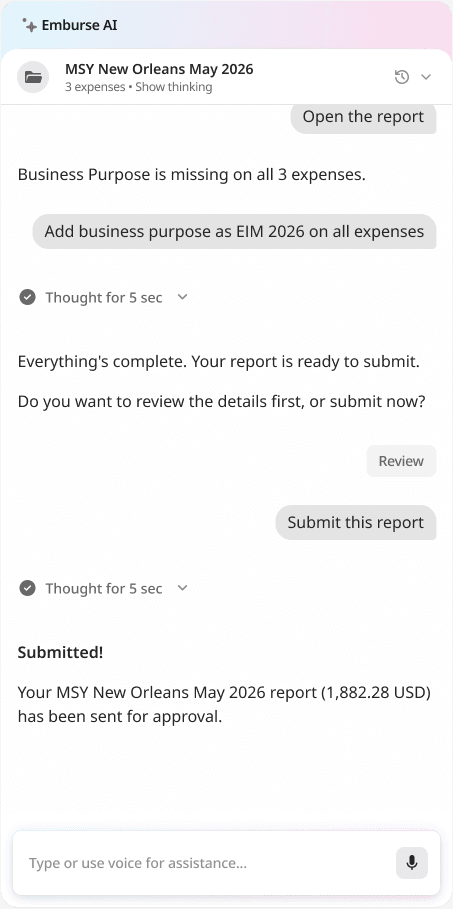
Meet the AI Agent employees love using
Powered by Emburse AI, our new AI agent proactively analyses travel and expense workflows, including transactions, receipts, and expense data, to prepare timely, accurate expense reports.
FAQs
Employee expense management is the process businesses use to track, approve, reimburse, and report employee expenses. Expense management software supports employee receipt capture, approval workflows, expense reporting, and accounting integrations.
Businesses use expense management software to reduce manual processing, improve reimbursement speed, strengthen spend visibility, and centralise approval workflows.
Employees may claim approved business expenses including travel costs, accommodation, mileage reimbursement, software purchases, client meals, and remote work expenses depending on company policy.
AI improves expense reporting by categorising expenses automatically, detecting duplicate claims, identifying unusual spending patterns, and accelerating receipt capture workflows.
Mobile expense apps improve reimbursement speed because employees can submit expenses immediately after transactions occur instead of waiting to complete manual reports later.
Australian finance teams often prioritise integrations with Xero Australia, MYOB, NetSuite, QuickBooks, Sage, Microsoft Dynamics, and ERP platforms that support automated reconciliation and reporting visibility.